





System online // Operations & AI automation specialist

Human insight. Machine precision.

I architect AI agents and autonomous workflows that turn operational friction into reliable digital machinery.

Experience
11+ yrs
Virtual assistance
5+ yrs
Project management
~4 yrs
Based in
Cebu, PH

The business moves. Everything still waits on you.

Every approval, every handoff, every process that only lives in your head. It works until you step away.

01 // Capabilities

Six systems that stop the work depending on you.

Each one runs on its own. Most businesses start with whichever is costing them the most hours, then connect the rest later.

  • SYS_A1

    Workflow automation

    The same few tasks, done by hand, every single day. I build the pipeline that does them instead, including the connections no off-the-shelf tool will make for you. Your team stops spending its week on work a system should be doing.

  • SYS_A2

    AI agents & sub-agents

    A chatbot answers questions. An agent does the job. I build agents that own a piece of your operation — chasing the client email nobody replied to, keeping the project board honest, answering your team's process questions in chat — and the lead agent that runs them, built around the way you already work.

  • SYS_A3

    CRM & lead automation

    Leads go cold while everyone is busy. I set up the follow-up that runs whether or not anyone remembers, so every lead gets worked the same way and you close more of what you already paid to get in the door.

  • SYS_A4

    Data & knowledge management

    Three versions of the same number and nobody sure which one is right. I build the single record everything else answers to, so your team stops rebuilding the same spreadsheet and starts trusting what it opens.

  • SYS_A5

    Project & operations management

    When the person who knows the process is out, the work slows to whoever can guess. I get it written down, assigned and tracked, so delivery stays the same whoever is on shift.

  • SYS_A6

    Business systems support

    Accounting, property, domains. The back-office tools nobody owns until they break. I keep them running and connected, so the quiet stuff never turns into your afternoon.

Built on the tools your team already opens every day.

n8n Zapier GoHighLevel ClickUp Notion Google Sheets Google Drive Gmail
Slack WhatsApp Google Chat Claude ChatGPT Fathom Stripe Kick.co

02 // Project archive

Automation in production

Real systems designed around accuracy, safety, and measurable operational relief.

A filled marker is a counted figure. A half marker is an estimate.

  • SYS.01

    Client onboarding automation

    One form sets up every system before the client closes the tab.

    15–25 min

    Of manual setup per client, removed

    estimated

    • n8n
    • Notion
    • Drive
    • Chat
    • ClickUp

    4

    Systems set up automatically from one submission

    measured

    0

    Reference numbers anyone types to link a record

    measured

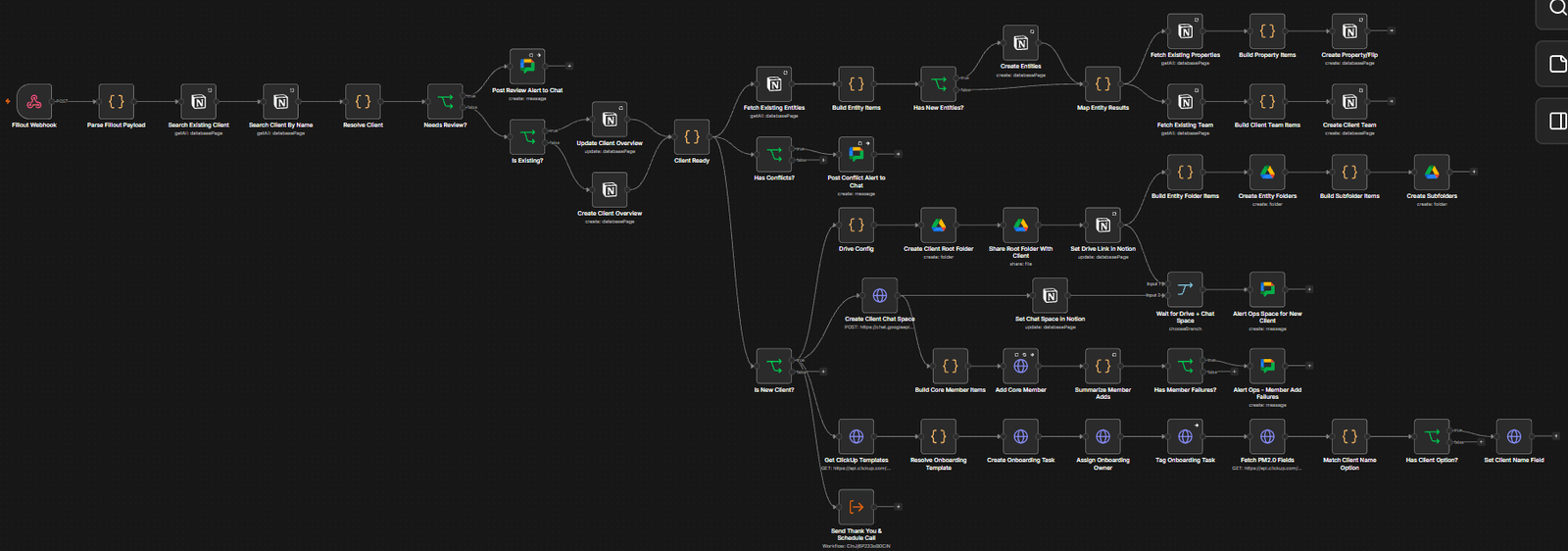
    The whole run: one intake form branching into client, entity, property, Drive, Chat and ClickUp.
    The whole run: one intake form branching into client, entity, property, Drive, Chat and ClickUp.
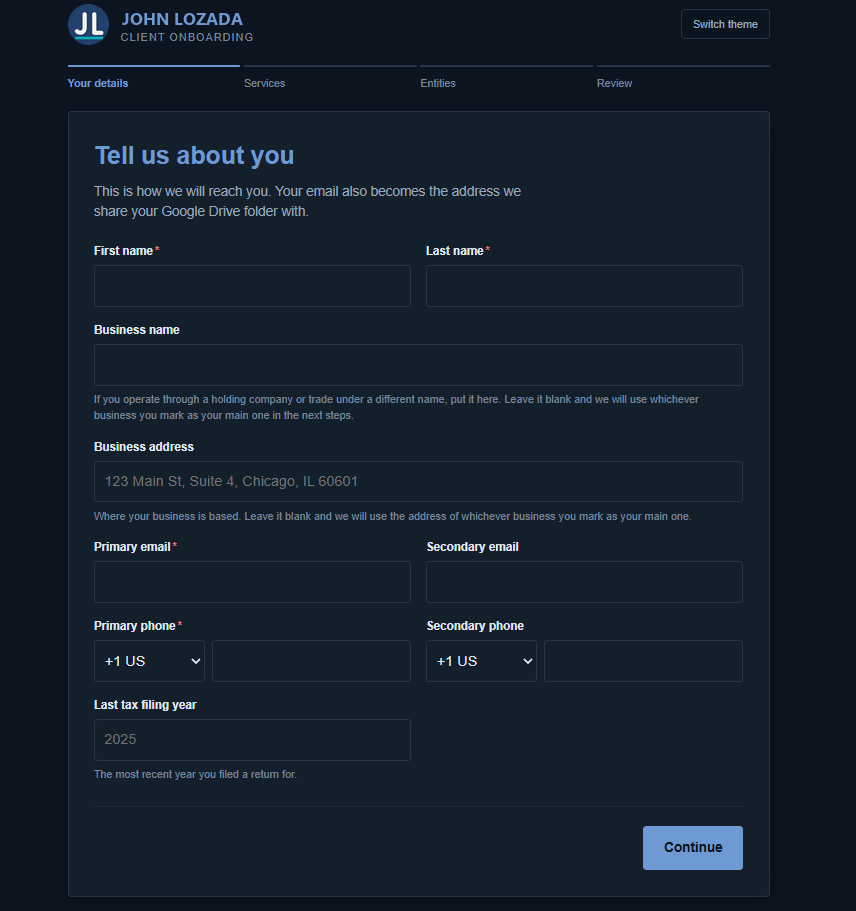
    The intake form in its dark theme, showing the name, business and contact fields.
    The form itself — self-hosted in the project’s own repository, and it replaced a third-party form builder entirely.
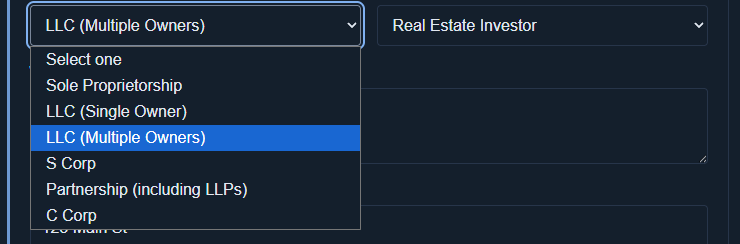
    The entity type dropdown open, listing the company structures the form accepts.
    Entity type decides what the form asks next: anything co-owned and it asks about the other owners.
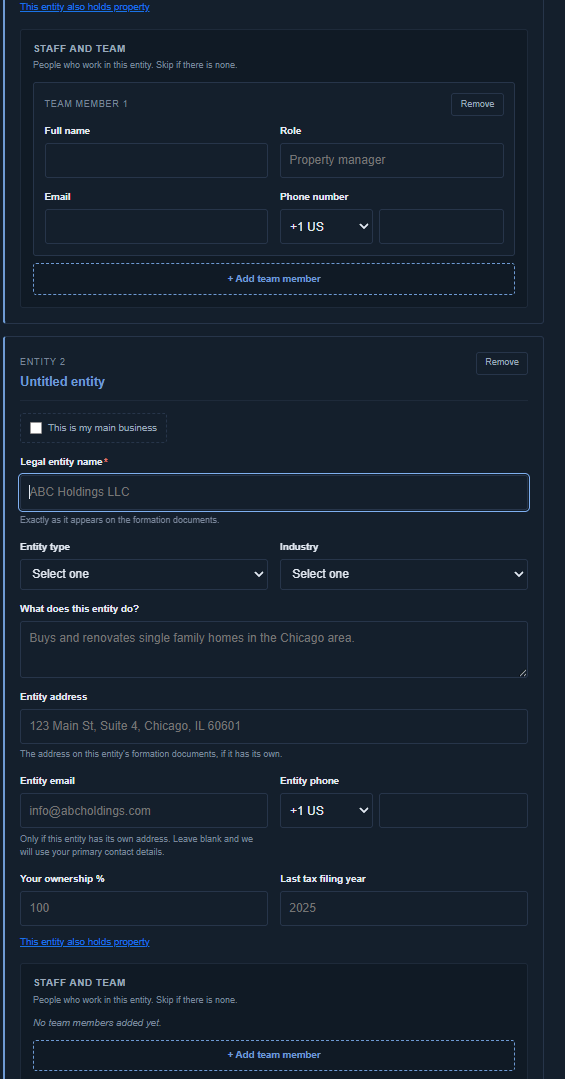
    Team members entered inside the company they belong to, rather than linked by a reference number.
    People are entered inside the company they belong to. The relationship comes from where it sits on the form, not a typed reference number.
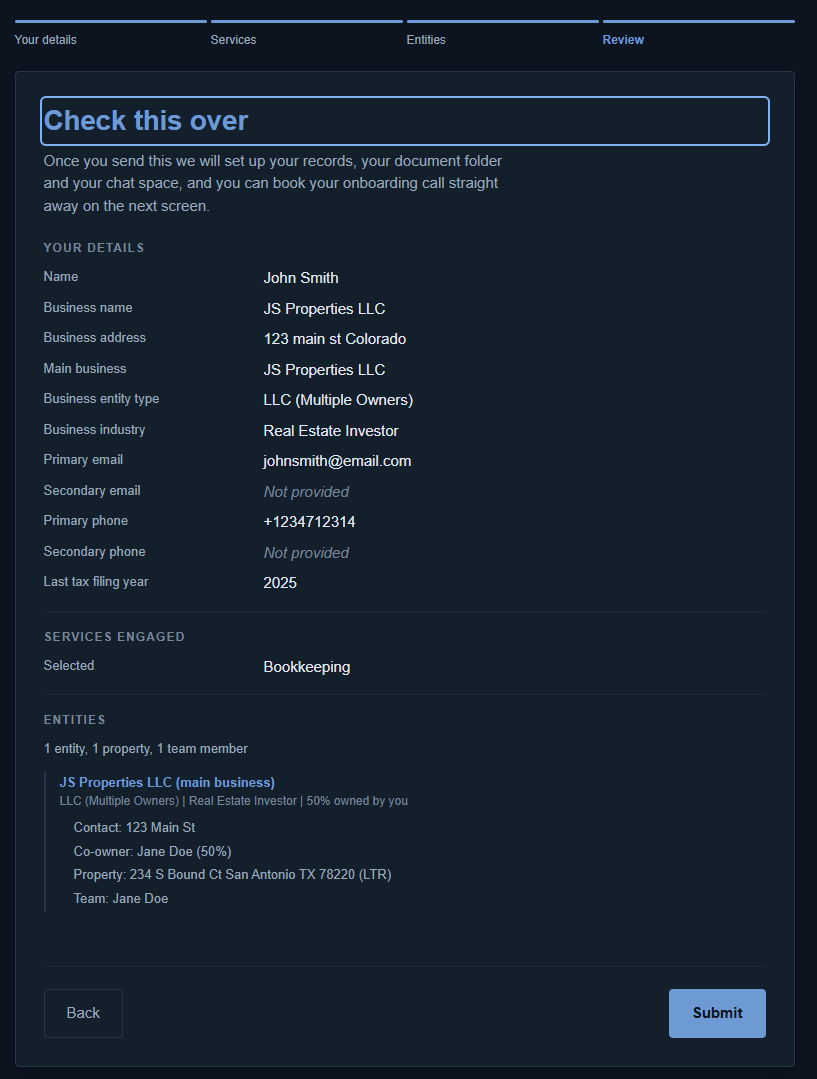
    The review step, laying out every company, asset and person on one page before submitting.
    The review step: every company, asset and person on one page, at the only moment when fixing a mistake is free.
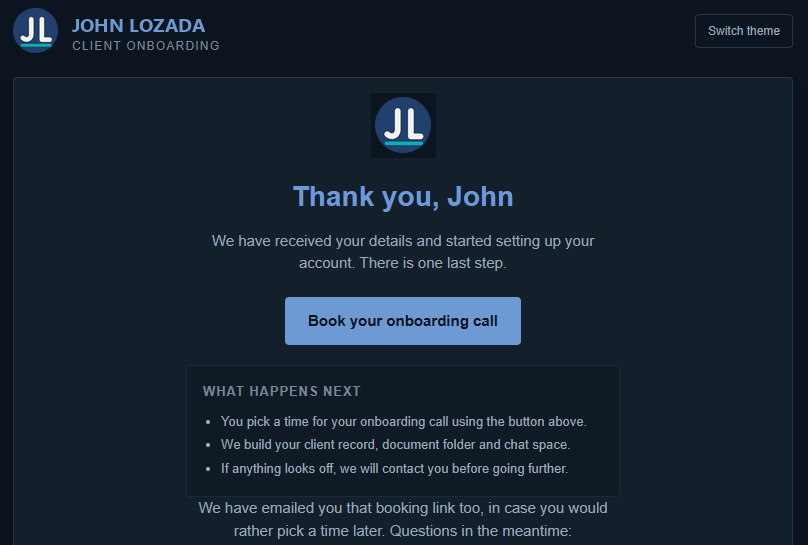
    The thank-you page, telling the client there is nothing else to send and asking them to book a call.
    What the client sees on submit — told plainly there is nothing else to send, and asked to book the call.
    1 / 6
    Problem

    Onboarding a real-estate investor meant manually creating and linking every client, entity, property, and team member. A mistyped reference could file a property under the wrong LLC and create a costly bookkeeping error months later.

    System

    One form now creates the client record, nested entities and properties, team records, Drive folder tree, dedicated Chat space, ClickUp onboarding task, and the follow-up that asks the client to book their call.

    Result

    Each client launches from one verified source of truth. Entity-to-property relationships can no longer be mistyped, setup is consistent, and 15–25 minutes of staff work is removed from every onboarding.

  • SYS.02

    GoHighLevel SMS reminder loop

    Hours of hand-sent reminders gone, and the wrong person can’t get the text.

    2–3 hrs / week

    Manual sending time removed

    estimated

    • GoHighLevel
    • Calendar logic
    • Drip control

    2

    Recurring events driven by a single workflow

    measured

    25 / 10 min

    Contacts per batch, spaced to protect deliverability

    measured

    A warm-list tag entering a calendar-aware wait loop that branches on the third week of the month.
    A warm-list tag entering a calendar-aware wait loop that branches on the third week of the month.
    Problem

    Reminders for two recurring events were sent by hand every week: pull the current member list, work down it in batches, then go back and check the messages landed. Two to three hours gone every week, on a job where one mistyped recipient sends the wrong person the wrong message — plus a monthly send that only fired on the third Thursday, so someone had to track which week of the month it was.

    System

    One tag defines who is in. The loop resolves its recipients from that tag, waits for Wednesday, detects the third week from the date, and sends in throttled batches of 25 — the same batching that used to be done by hand, now unattended and paced to keep the number in good standing. Nobody selects a recipient, so nobody can select the wrong one.

    Result

    Two to three hours a week came back, and a misdirected text is off the table by construction rather than by care. Membership is managed by adding or removing one tag; the sends run indefinitely with nobody scheduling, pressing send, or verifying them afterwards.

  • SYS.03

    Fathom meeting intelligence router

    Every call written up, filed and turned into tasks in about fifteen seconds.

    39

    Meetings processed in a 14-day window — about 2.8 a day

    measured

    • Fathom
    • AI classification
    • Notion
    • ClickUp

    25–35 hrs

    Of admin per month no longer done by hand

    estimated

    ~15 sec

    From a call ending to everything being filed and sent

    estimated

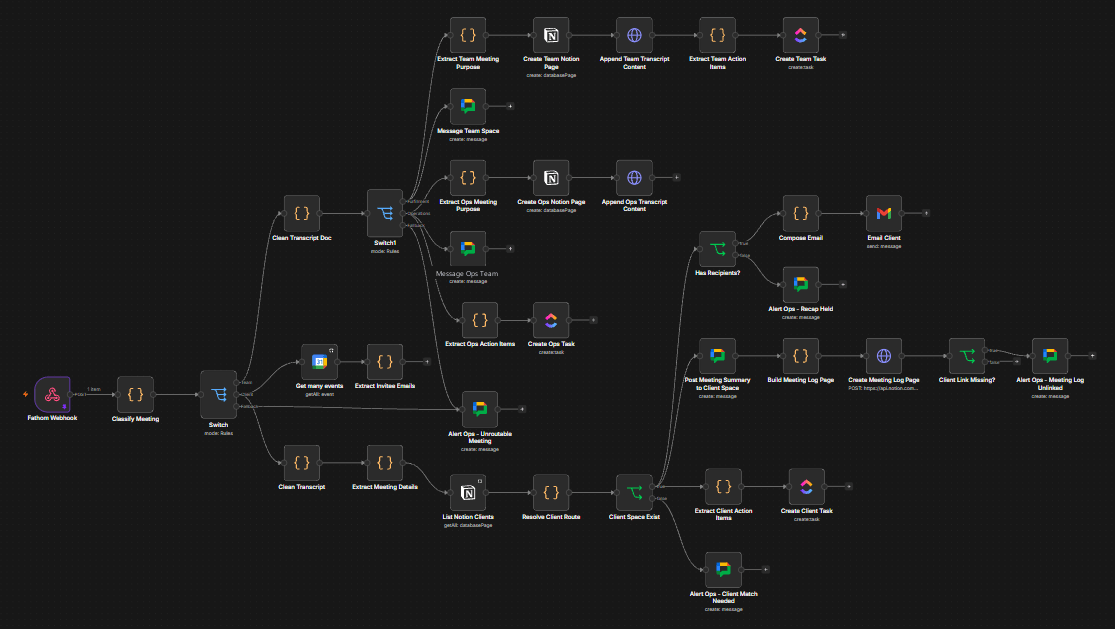
    A webhook fanning into parallel branches that classify the meeting, resolve the client, then write out.
    A webhook fanning into parallel branches that classify the meeting, resolve the client, then write out.
    Problem

    The difficult part was not summarizing calls, but identifying the correct client without leaking one client’s information into another client’s workspace. Weak evidence had to produce a refusal, not a guess.

    System

    After each call, parallel branches classify the meeting, prepare content, and identify the client through title segments, trusted attendee addresses, known speakers, and transcript evidence. All outward actions stay behind a confidence gate.

    Result

    Within about 15 seconds, confident matches receive a recap email, internal Chat briefing, complete Notion record, and assigned ClickUp tasks. Uncertain calls send nothing externally and request a quick human confirmation instead.

  • SYS.04

    Sales assistant AI agent

    Buying signals answered within fifteen minutes, with a full audit trail.

    15 min

    Longest wait before a prospect’s reply is read and acted on

    measured

    • AI agent
    • Fathom
    • Gmail
    • ClickUp

    5

    Separate tools the AI must go through to do anything at all

    measured

    Both sides

    Of every decision: the situation recorded before, the outcome after

    measured

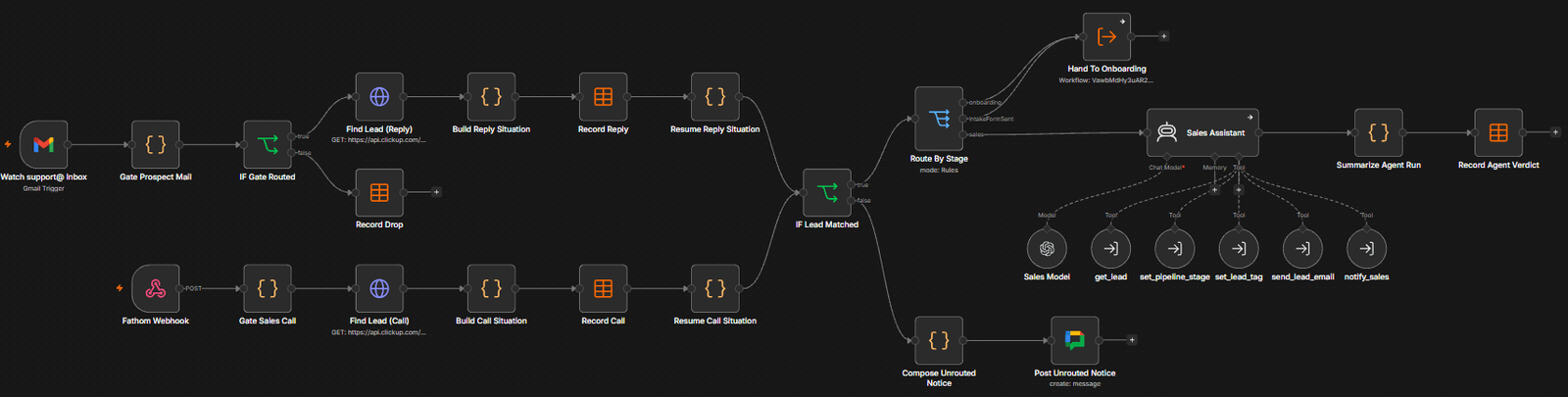
    The whole system: both triggers, the audit writes, and the five tools hanging off the agent.
    The whole system: both triggers, the audit writes, and the five tools hanging off the agent.
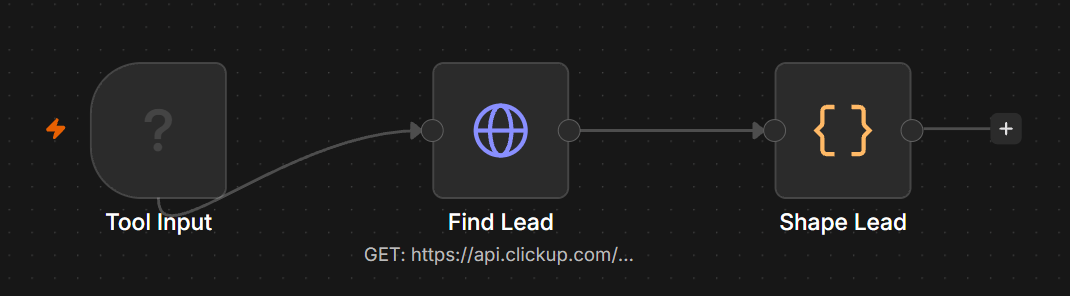
    Looking a lead up. Read-only.
    Looking a lead up. Read-only.
    Moving a pipeline stage, behind six checks.
    Moving a pipeline stage, behind six checks.
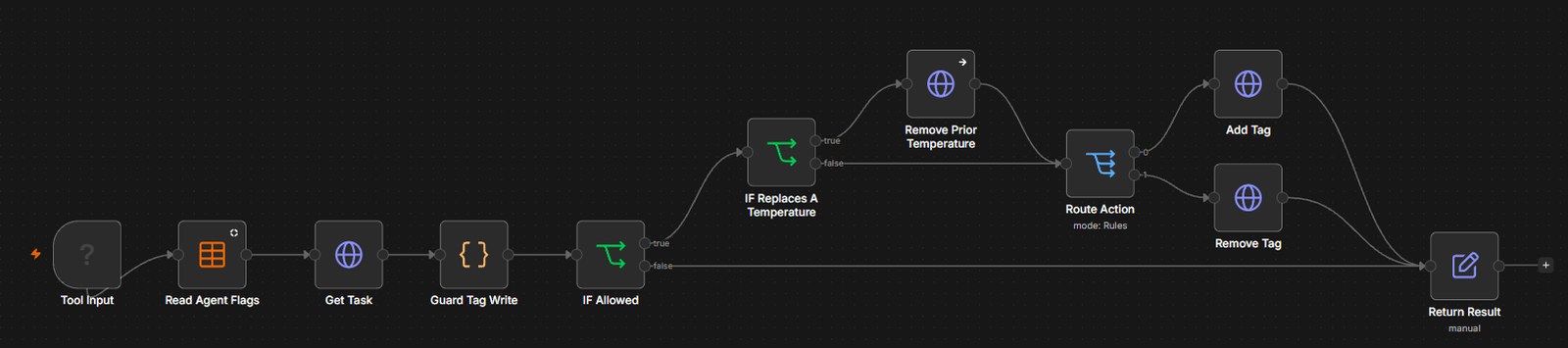
    Setting a temperature tag.
    Setting a temperature tag.
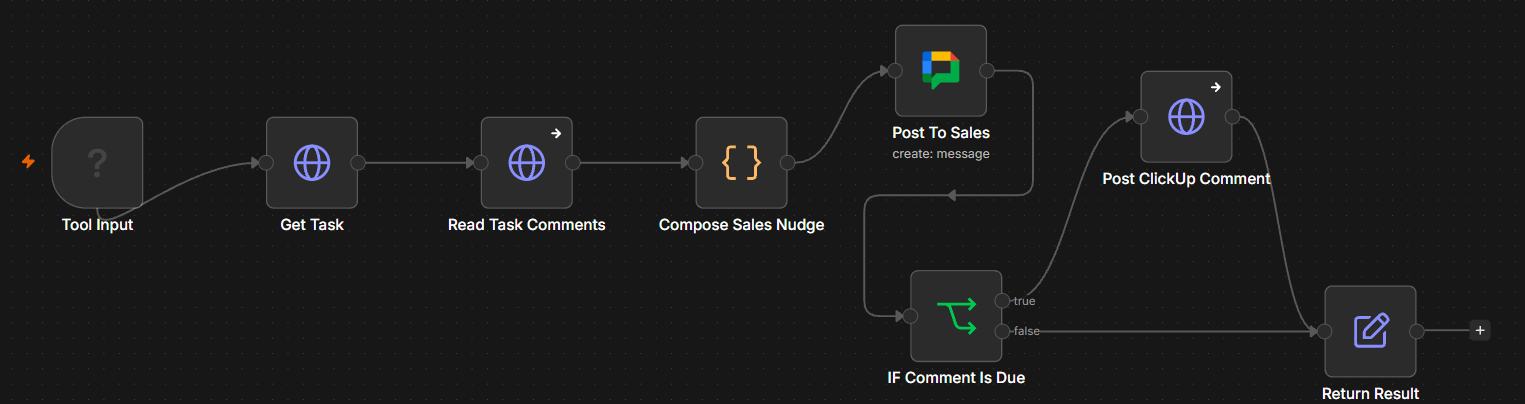
    The only tool with an outside audience.
    The only tool with an outside audience.
    The escape hatch: flag a human.
    The escape hatch: flag a human.
    1 / 6
    Problem

    The pipeline only moved when someone remembered to move it. Buying signals waited unread in an inbox, while unqualified calls aged in the pipeline as if they were still live opportunities.

    System

    A completed discovery call or a 15-minute inbox poll identifies the lead, records the raw event, and hands it to an AI agent. Guarded tools let the agent retrieve records, change stages and tags, send follow-ups, and notify sales.

    Result

    Buying signals can receive action within 15 minutes, dead leads are parked instead of distorting the pipeline, and every event, decision, and outcome remains recorded for a complete audit trail.

  • SYS.05

    GoHighLevel account, built from empty

    Carrier registration through to the funnel and the twenty-one automations running on it.

    17 of 50

    Free registrants who became paying VIP clients

    measured

    • GoHighLevel
    • A2P 10DLC
    • DNS
    • Funnel
    • Pipelines

    3 weeks

    A2P 10DLC brand and campaign approved, first submission

    estimated

    21

    Automations running across the account

    measured

    GoHighLevel’s A2P messaging panel, showing brand status approved, campaign status approved, and SHAKEN/STIR caller ID approved.
    01 SetupCarrier registration first, because everything waits on it. Brand and campaign both approved on the first submission.
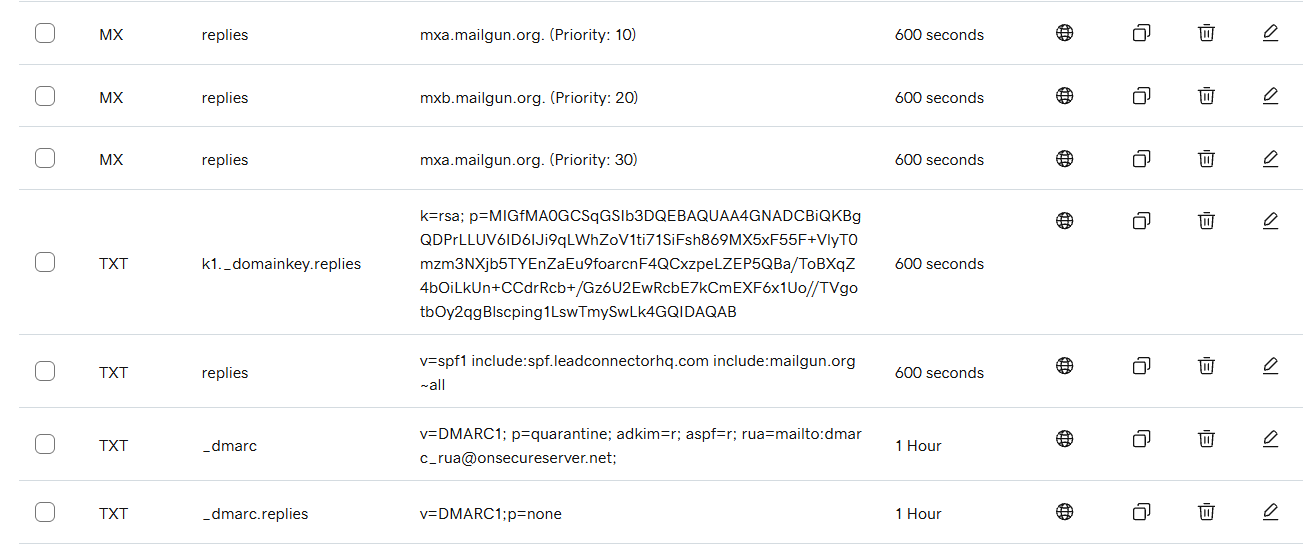
    DNS records showing mail exchange entries, a DKIM signing key, an SPF record, and a DMARC policy set to quarantine.
    01 SetupThen the domain and its mail: SPF, DKIM and DMARC, with the policy set to quarantine rather than the do-nothing default.
    The pipeline board: four stages from Free Registrant to VIP Ready, with thirty-three opportunities in the first and seventeen in the last. Names and values are redacted.
    01 SetupThen the CRM: four pipeline stages from free signup to ready for the call. Thirty-three in the first, seventeen in the last. Names and values redacted.
    The funnel landing page: headline, an embedded video, a four-field opt-in form, a call to action and a countdown to the event date. The presenter’s face is redacted.
    02 FunnelOnly then the funnel. The page everyone thinks of as the project, sitting on the account that makes it able to send.
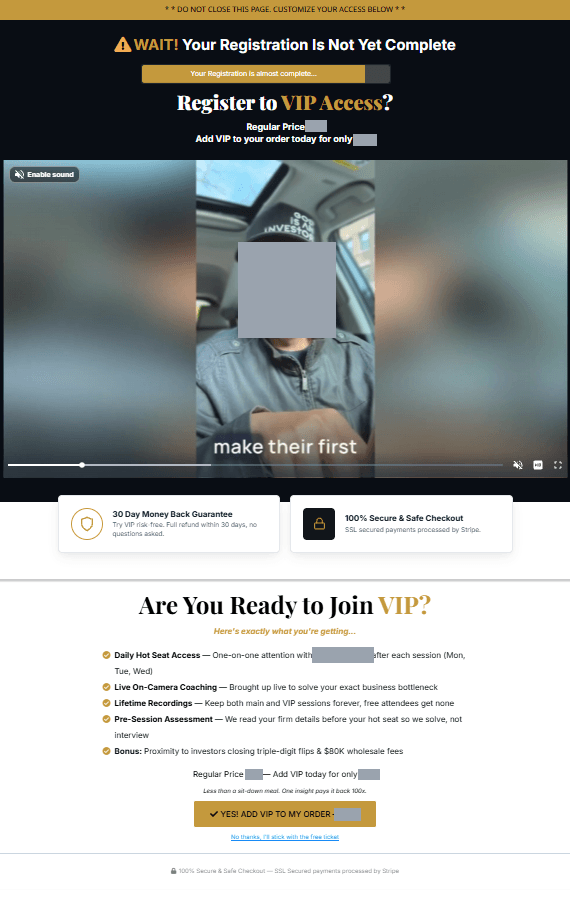
    The upsell page: a warning that registration is not yet complete, a video, and a VIP tier offered at a reduced one-time price, with a money-back guarantee and secure-checkout badges. The presenter’s face is redacted.
    02 FunnelThen the upsell, held in front of the registration rather than after it. A paid tier offered to somebody who has already said yes to the free one.
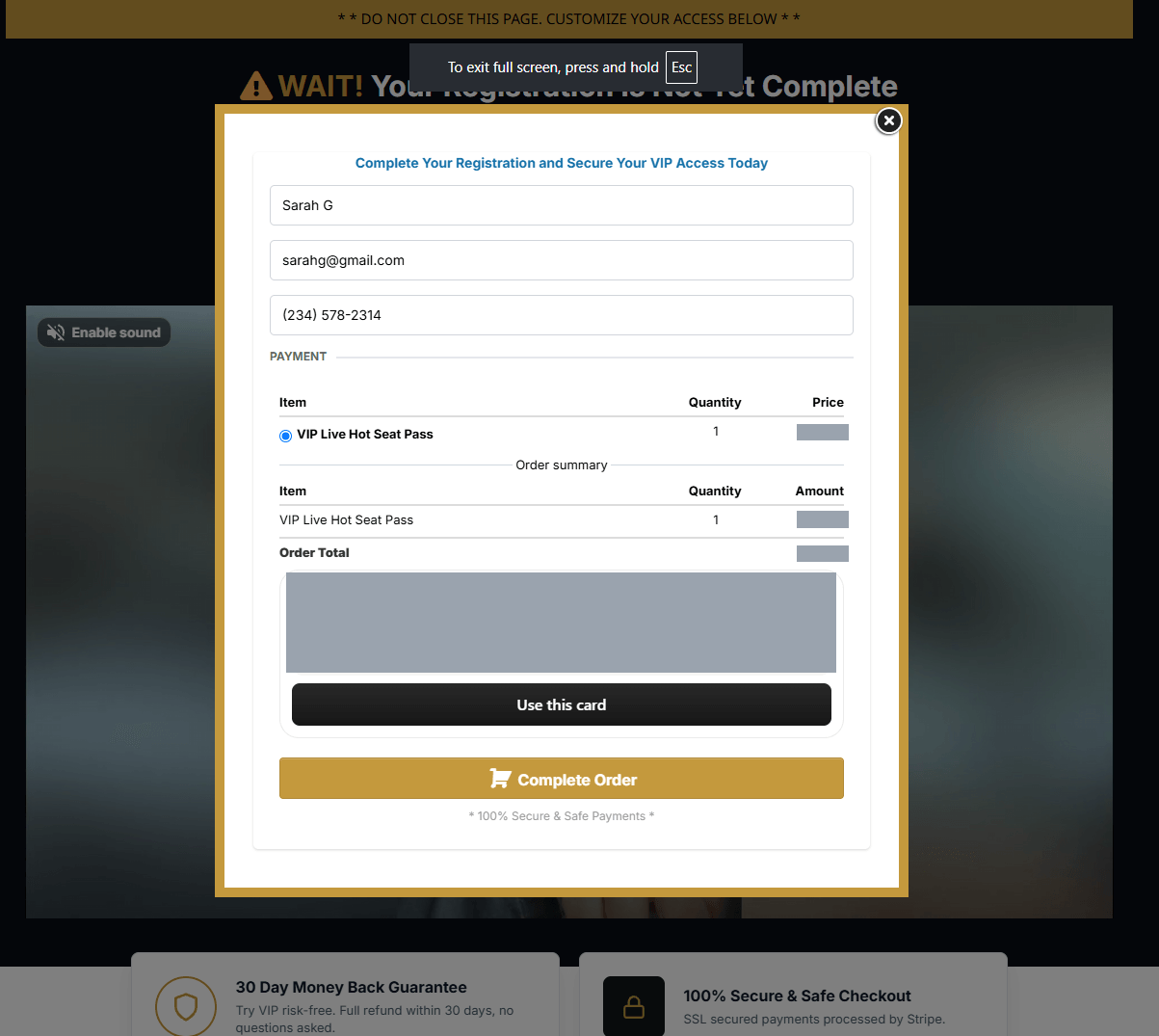
    The checkout overlay: name, email and phone fields, a VIP Live Hot Seat Pass line item at twenty-seven dollars, an order total, and a Complete Order button. The saved payment method is redacted.
    02 FunnelAnd the checkout. A priced line item and an order total, which is the event the payment workflow branches on later in this sequence. The saved card panel is redacted.
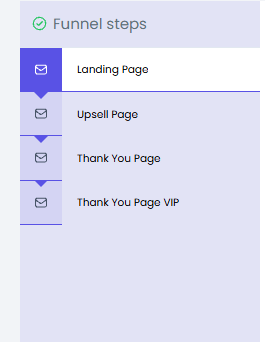
    The funnel step rail: Landing Page, Upsell Page, Thank You Page, and Thank You Page VIP.
    02 FunnelFour steps, with a separate thank-you page per tier, so a free registrant and a paying VIP leave down different paths.
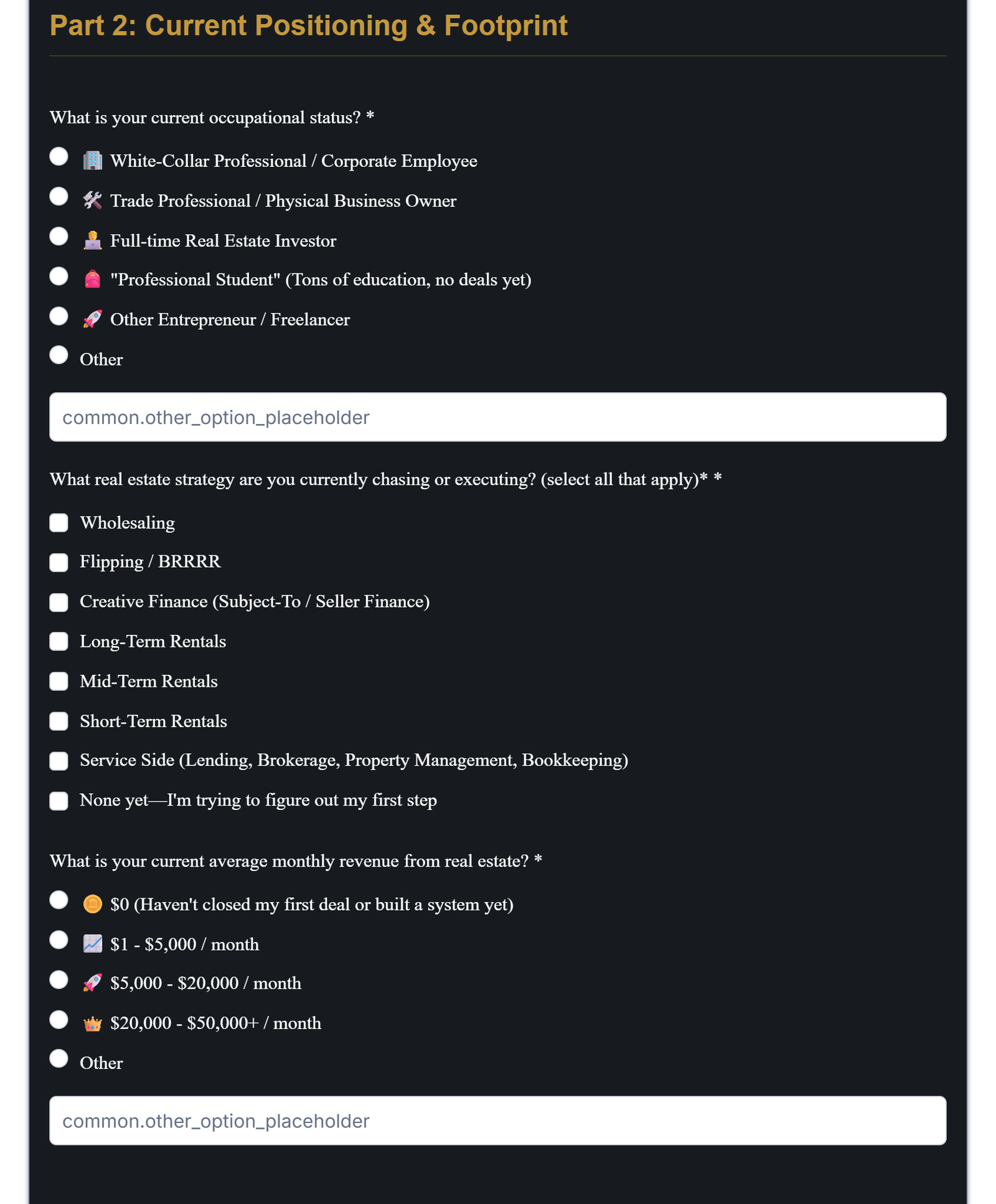
    The pre-event assessment form, asking what a registrant currently does, which strategies they are pursuing, and what they earn in bands.
    02 FunnelBetween the funnel and the pipeline, a form that sorts registrants by what they already do and earn. It is why the calls at the end were worth having.
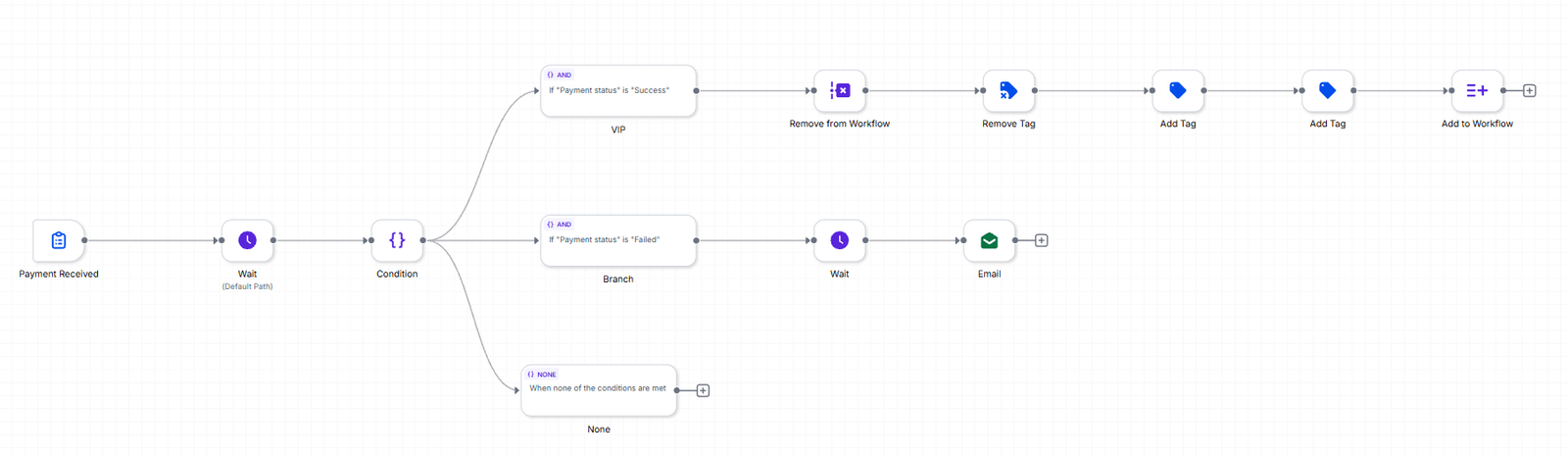
    The payment workflow branching on payment status: success moves the buyer on through tagging, failure waits and then sends a recovery email.
    03 AutomationsNow the automations run on all of it. The paid path checks the payment actually cleared; a declined card gets a recovery email rather than being counted as a sale.
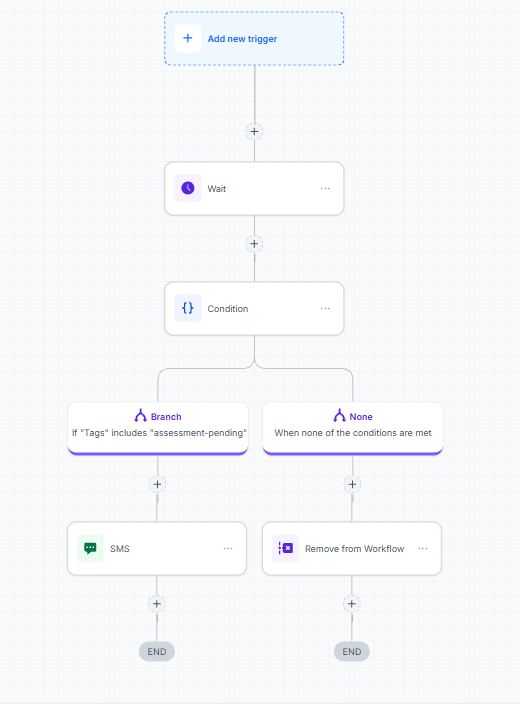
    The assessment chase workflow, opening on a condition named Is it Event Day or Later? and running reminders across email and SMS on the branch where the event has not yet started.
    03 AutomationsThe chase for that form stops the moment it stops being useful. The host reads the answers beforehand, so one arriving on the day is too late to shape anything.
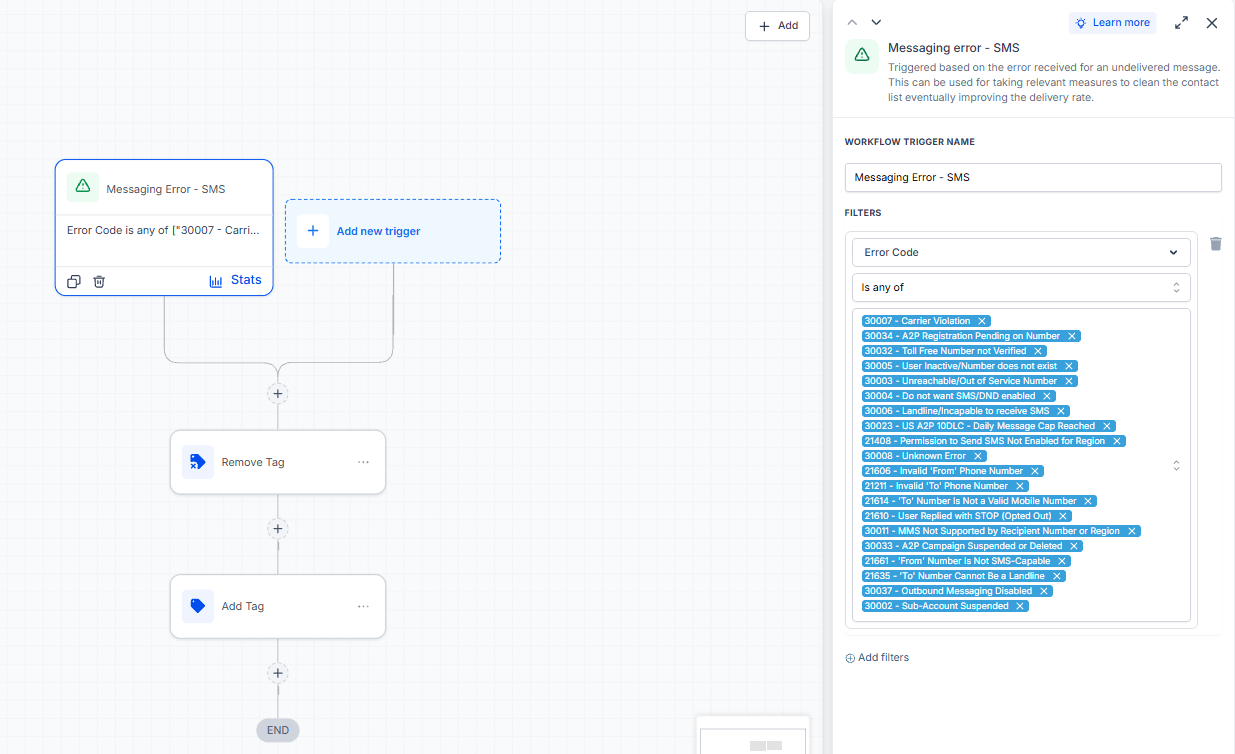
    A workflow triggered by SMS messaging errors, filtered on twenty carrier error codes including three specific to A2P registration.
    03 AutomationsAnd the half nobody advertises: twenty ways a text can fail, caught and tagged, including the three that mean the registration itself is suspended, pending or capped.
    1 / 11
    Problem

    The business wanted a funnel that could take registrations, text people about the event, and take payment. The funnel is the quick part. A US business cannot text American mobiles until it is registered with the carriers, and unregistered texts do not fail loudly — they quietly do not arrive, for some people and not others, with nothing on screen to say which. Three more layers sit under that and break a launch just as silently if they are skipped: the domain, email authentication, and what happens to a message that fails.

    System

    Built from empty, in the order the work has to happen. The account first: A2P 10DLC brand and campaign registration, because everything waits on it, then the domain wired in with CNAME records so pages, tracked links and replies run on the business’s own, then SPF, DKIM and DMARC, then a tag-driven CRM with a four-stage pipeline behind it. Then the funnel: four steps with a separate thank-you page per tier, and an assessment form that sorts registrants before anyone gets on a call with them. Then twenty-one automations running on all of it, in two groups. One drives the event. The other catches every bounce, complaint, opt-out and failed number, strips that contact’s tags and marks them cold, so they fall out of every sequence at once.

    Result

    The launch could send, and it converted: fifty registrations across a two-week window either side of the opening, seventeen of them paying clients. Carrier registration passed on the first submission, in about three weeks. Twenty failure codes are caught and tagged automatically — including the three that mean the registration itself is suspended, pending or capped — so the list cleans itself rather than degrading until somebody notices.

  • SYS.06

    Company workspace, rebuilt from spreadsheets

    Thirty client spreadsheets became one workspace, and nobody hunts for a client card any more.

    30+

    Client files migrated off spreadsheets in two weeks

    measured

    • Notion
    • ClickUp
    • Drive

    25 → 8

    Tabs in one client’s file, replaced by eight linked databases

    measured

    1

    Places to look for any client’s record, down from one folder each

    measured

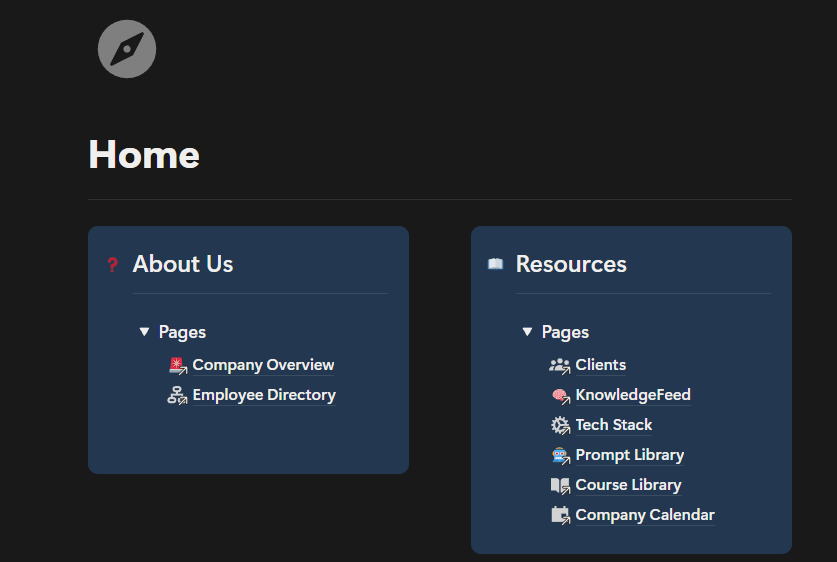
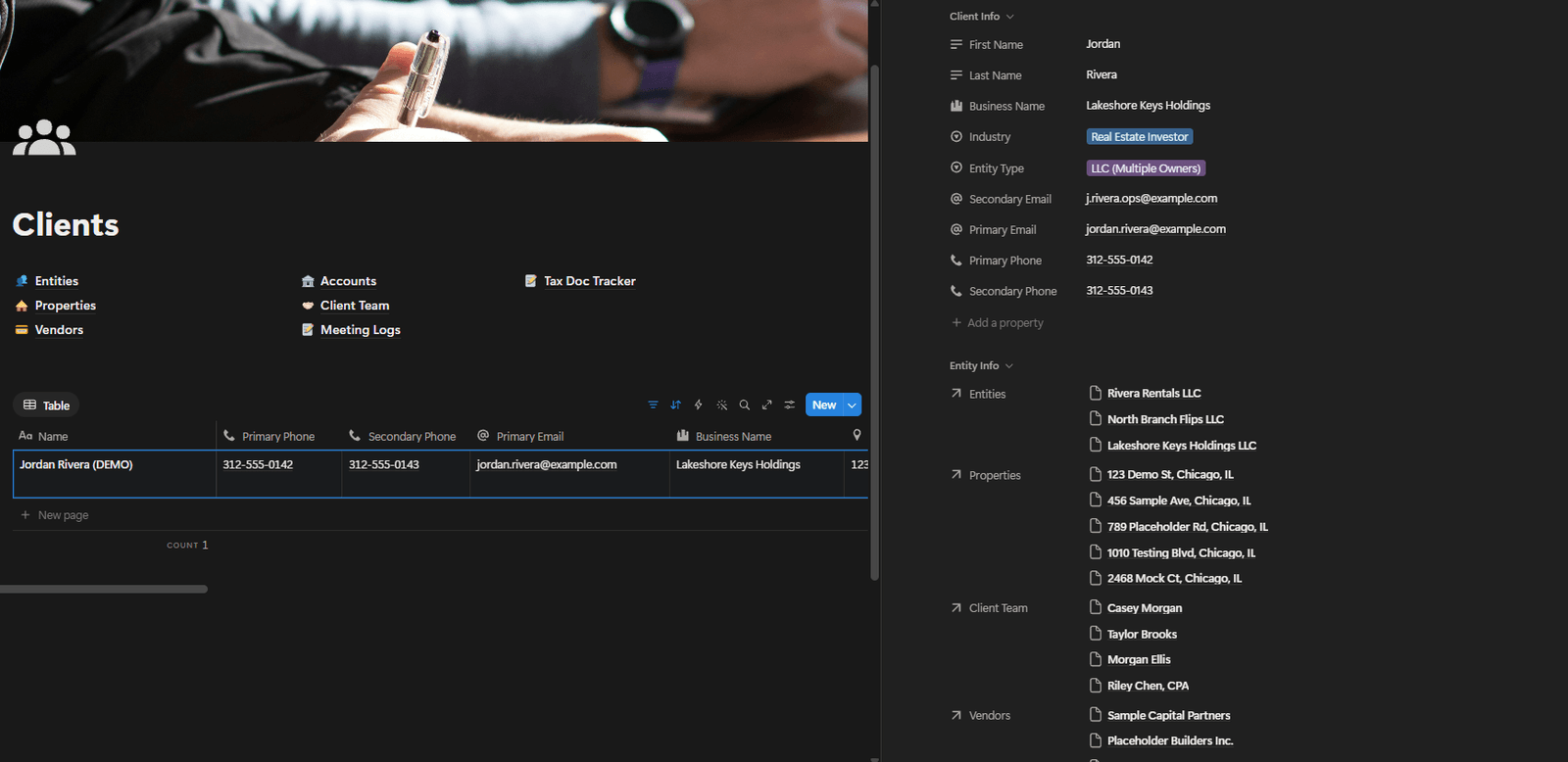
    The company home page, where the client database sits alongside the team directory and the shared libraries.
    The client data needed a home, not just a structure — somewhere a new starter lands and can see what exists.
    One client record, with every company, property, account and contact linked to it.
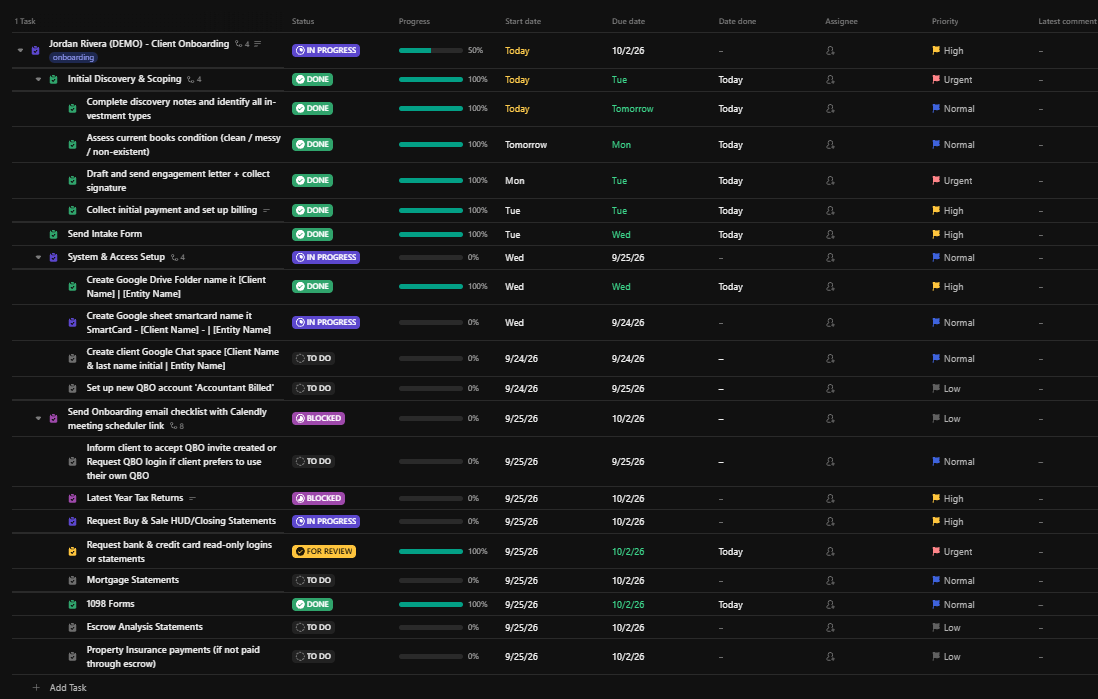
    One view of every client replaced “go to the folder, open the file.” It is also what the onboarding automation writes into.
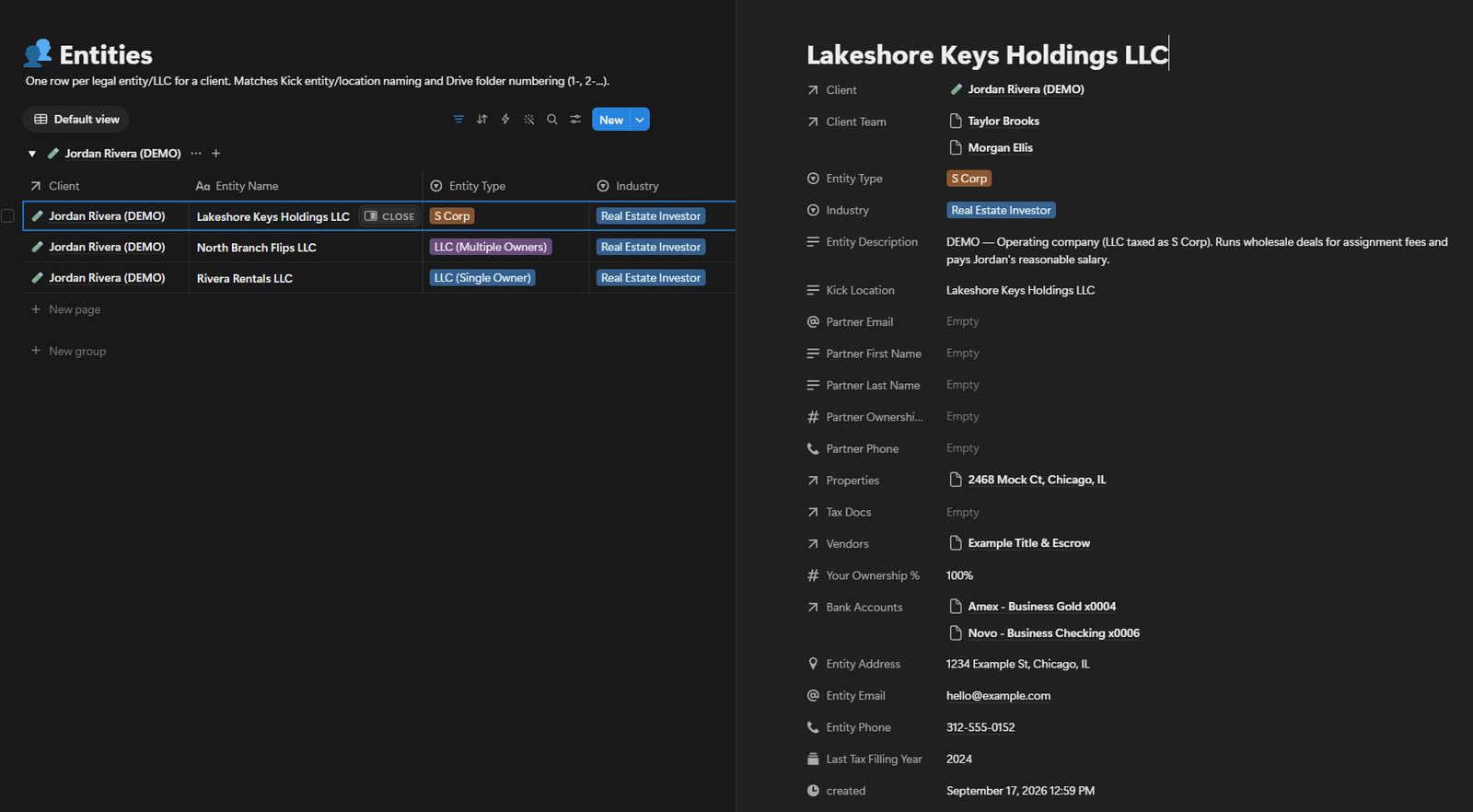
    One row per company, named to match the bookkeeping platform and the Drive folders.
    Companies carry the same name here as in every other system, so finding the same thing twice stops being an act of translation.
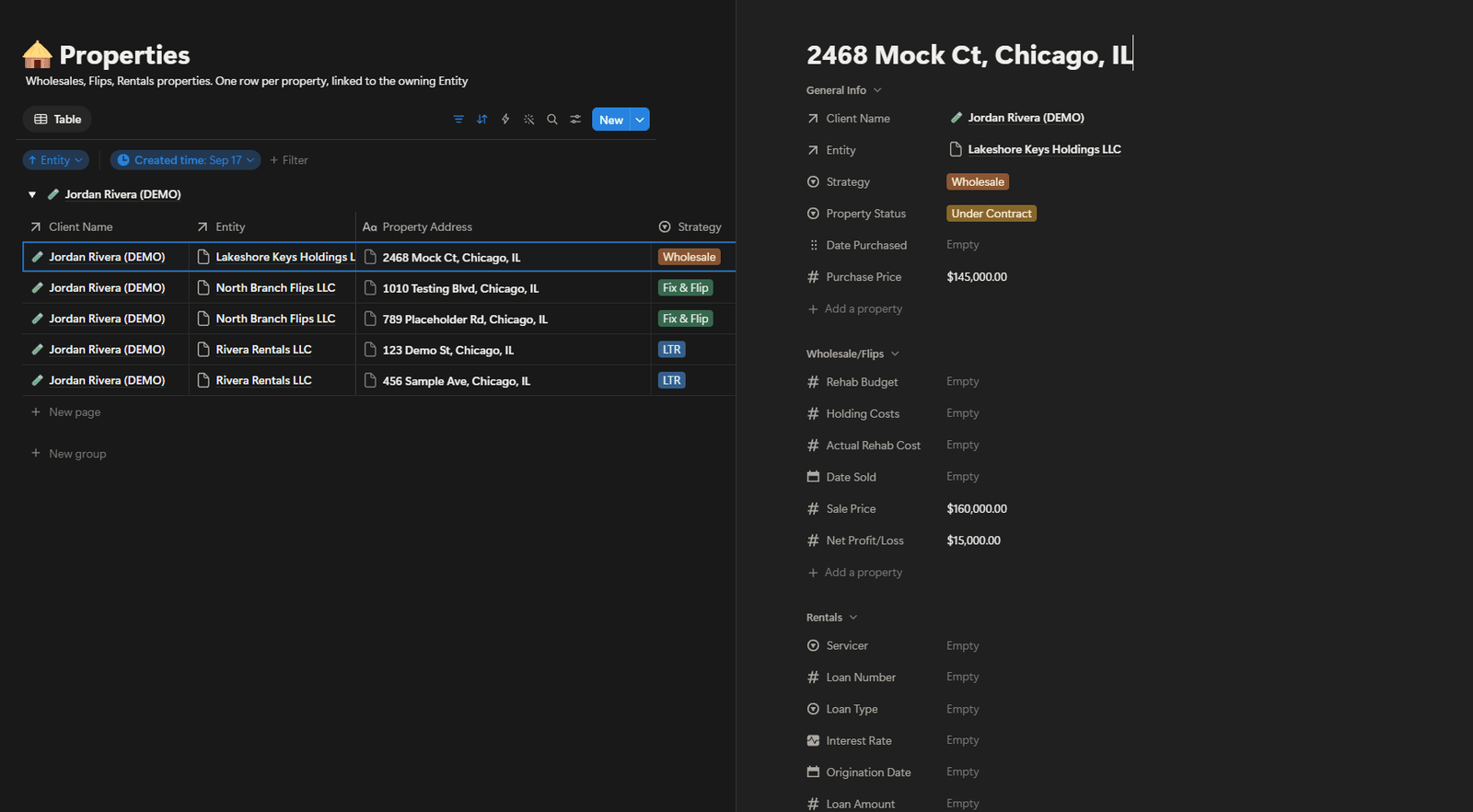
    Properties, each one attached to the company that owns it.
    The link is held by the system, so it reads true from either end — which twenty-five loose tabs could not do.
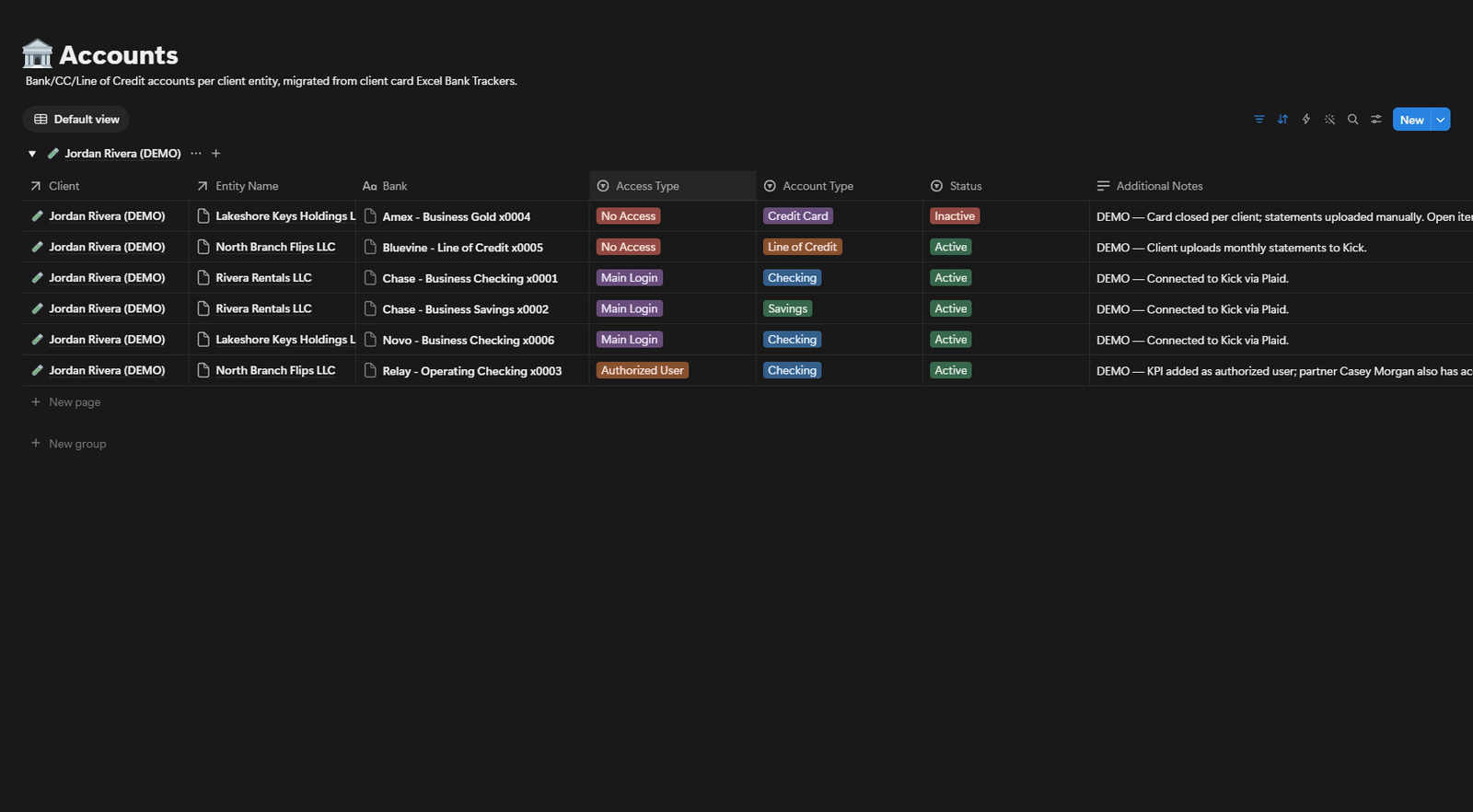
    Bank accounts, recording what level of access the team already holds.
    Main login, authorised user, or none. Recording it is what stops a client being asked twice for access they already gave.
    Client work laid out as a task board with stages, owners and dates.
    Client work runs as a board, so its state is visible without asking whoever is doing it.
    1 / 6
    Problem

    Every client lived in their own spreadsheet, in their own folder — around twenty-five tabs of trackers, checklists and somebody’s personal notes, with no two files organised the same way. Finding one client’s bank details meant knowing which folder, which file and which tab, and that knowledge lived in the heads of whoever had been there longest. New starters could not work unaided, clients were asked again for access they had already granted, and document requests went to the client instead of to the assistant who actually held them.

    System

    One workspace, with a company home page above a client database. Each client has one record, and their companies, properties, bank accounts, vendors, team and meeting history attach to it as links rather than sitting in tabs beside it — so a property reads back to its company and its client from either end. Companies are named to match the bookkeeping platform and the Drive folders. Accounts record whether the team holds the main login, is an authorised user, or has no access. The client’s own staff are tracked separately from ours, with what each is responsible for. Thirty-plus files were migrated in two weeks: by hand at first, which is where the structure came from, then with a purpose-built tool.

    Result

    One place to look, and the answer is attached to the client rather than filed somewhere near them. Twenty people share it, and the new ones no longer need to learn how each client’s spreadsheet happened to be organised, because every client now has the same shape. No time-saved figure is claimed: the real cost was interruptions, repeat requests to clients and staff who could not work unaided, and none of those is a stopwatch measurement.

John Lozada, in a black suit, cut out against a dark ground
Operator ID // JL-1120

03 // About the operator

Operations experience, upgraded with intelligent systems.

I’m John Lozada, an operations and technology specialist based in Cebu. Over 11+ years, I’ve learned where teams lose time, where handoffs break, and where small errors become expensive.

Today I combine that operational judgment with AI agents, APIs, n8n, GoHighLevel, and connected business systems. I build automation that knows when to act, when to route, and when to stop and ask a human.

Primary mode
Systems architect
Operating principle
Automate with guardrails

Experience log

  1. KPI Advisors

    Operations & Technology Specialist

    August 2022 – Present

    • Automation
    • Lead cross-functional projects and implement AI automation and workflow solutions.
    • Design n8n, GoHighLevel, and Zapier workflows to reduce repetitive manual work.
    • Develop and maintain SOPs that standardize processes and speed up onboarding.
    • Troubleshoot business systems and support new client onboarding end to end.
  2. JPMorgan Chase & Co.

    Consumer Online Tech Support

    September 2020 – May 2022

    • Enterprise
    • Resolved complex, escalated online-banking issues with a strong customer focus.
    • Diagnosed technical problems and delivered clear solutions under pressure.
    • Documented interactions and followed strict policies and service standards.
  3. KHLC Services LLC

    Real Estate Virtual Assistant

    April 2020 – August 2020

    • Real estate
    • Managed leads across the sales and acquisition pipeline.
    • Maintained the CRM and dialer system for accurate records and outreach.
    • Created SOPs and process documentation to standardize recurring tasks.
  4. Ardent Links Pinnacle Services

    Operations Manager

    December 2016 – January 2019

    • Agency ops
    • Ran day-to-day operations, campaign management, and client acquisition.
    • Hired, onboarded, and coached team members to improve productivity.
    • Coordinated resources and priorities across teams to keep delivery on track.
  5. Ardent Links Pinnacle Services

    Executive Assistant

    December 2015 – December 2016

    • Exec support
    • Provided client and customer support to maintain strong relationships.
    • Managed calendars, appointments, and daily administrative operations.
    • Supported customer retention and follow-up initiatives.

04 // Contact channel

Booking open // Free 30-min call

Ready to get your week back?

Bring the process that’s eating your week and you’ll leave with a map of what can be automated, what it takes to build, and what it’s worth.

No obligation // Reply within one business day // Cebu, PH (GMT+8)

Live calendar // pick any open slot